
Homework
These links are for websites that the school has paid for the children to access at home.
Click the logos to login!
Please see our parent guide to MyLogin at the bottom of the page.



Links to free websites to support your child's learning:
Find more suggested websites on our curriculum subject pages to find out more about things that have sparked your child's interest!
Parent guide to MyLogin (to access TTRS, Numbots and Spelling Shed).
What is MyLogin?
MyLogin is a tool that allows for quick, easy and secure access to applications via an easy-to-use dashboard for students. This is how the pupils should access TTRS, Numbots and Spelling Shed as they only need to remember their emoji password rather than lots of individual ones. The combination of emojis are individual to each pupil. If you do not have the emoji password for your child or or it isn’t working, please contact your child’s teacher or email the office to request a new one.
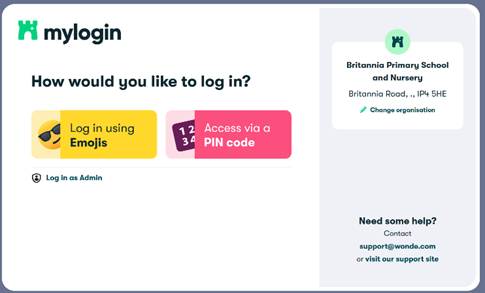
To access MyLogin, go to https://app.mylogin.com/login or google My Login and then find the link to login from there.
Type in Britannia Primary School and Nursery – make sure to check it is the one in Ipswich.
Britannia only use the ‘Log in using Emojis’ option. Simply click on the icon and then type in the 6 emojis to access the dashboard.
Once logged in, the dashboard should present you with tiles.
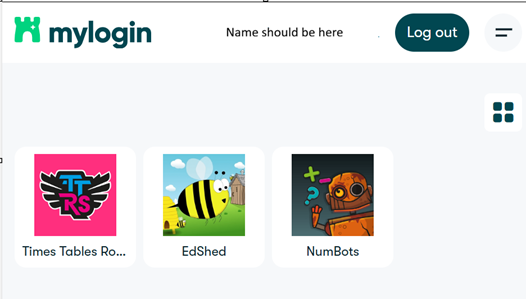
Clicking on them will take them to the application or link, logged in, if appropriate. You should be able to see TTRS, Numbots and Spelling Shed here.
If you need any more assistance with this, please look at the help guide here https://mylogin.zendesk.com/hc/en-gb/articles/21681291688861-MyLogin-Guide-for-Parents